AI that works across the hotel software you already use.

Masterkey connects your existing systems so AI can understand your hotel and carry out the work you approve.

Find the profit hidden in your hotel’s data.

Masterkey finds opportunities to earn more and spend less, bringing proposed changes into one place for you to review and approve.

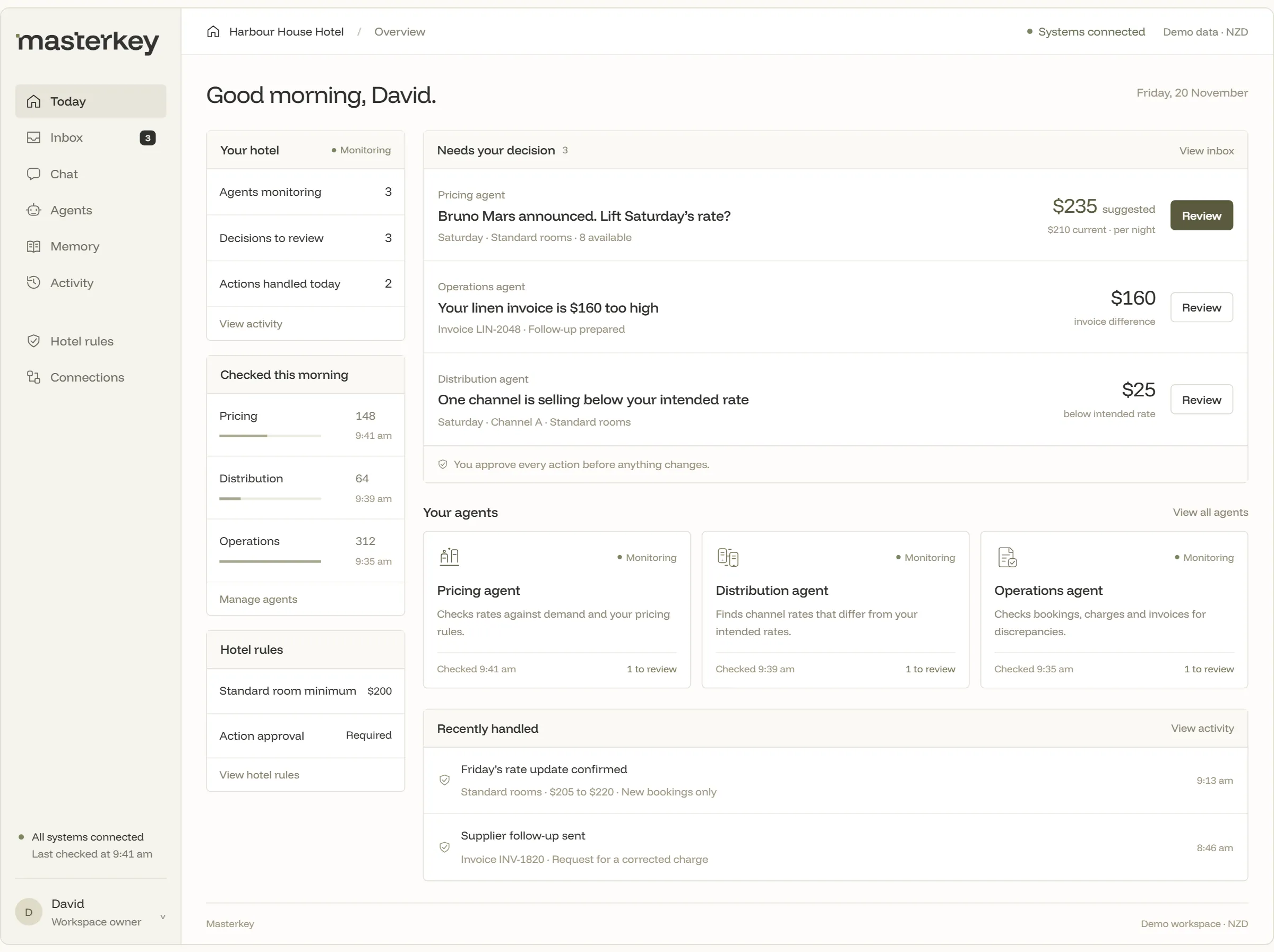
Masterkey product screen. David’s workspace, all systems connected, last checked at 9:41 am. Three findings to review: lift Saturday’s rate while demand is high, a linen invoice that is $160 too high, and one channel selling below the intended rate. Below them, changes done after approval, and the Pricing, Distribution and Operations agents with their last checks.

Put AI to work in your hotel.

01

Connect your existing systems.

Bring your hotel’s information together without manually exporting and comparing reports.

Rates · Availability · DemandPricing
Channel rates · Booking conditionsDistribution
Bookings · Charges · Supplier invoicesOperations
Masterkey
All systems connected
Last checked at 9:41 am

Connections

Give your agents the full picture.
Property managementBookings, room types, rates and charges
Channel managerPublished rates and booking conditions
Supplier invoicesInvoices and agreed charges

02

Find what needs attention.

Keep checking for issues, explain their estimated financial impact and recommend what to do.

Distribution agentOne channel is selling below your intended rate
$25below intended rate
Operations agentYour linen invoice is $160 too high
$160invoice difference
Pricing agent Bruno Mars announced. Lift Saturday’s rate? Saturday · Standard rooms · 8 available
$235 suggested
$210 current · per night
Review
03

Automate recurring work.

Run checks, prepare reports and deliver briefings on a schedule or when something changes.

Morning briefPreparingDelivered

Good morning, David.

Saturday’s rate has room to move
Your linen invoice is $160 over
A channel rate is $25 below target
Every morningSent to your inbox
04

Control what agents can do.

Set limits, approve proposed changes and see a record of every action.

Your rules+ Add a rule
Pricing agent

Keep every rate at or above $200.

Distribution agent

Never change a channel rate without my yes.

Operations agent

When an invoice is over the agreed price, send it to me first.

Every action is recorded in Activity.
05

Protect hotel and guest data.

Secure information with encryption, restricted access and clear rules for how it is used.

Data and access

Hotel dataEncrypted
Who can see itDDavidWorkspace owner
How it’s usedUnder your Hotel rules

Results from hotel teams like yours

“The review put the things we’d usually have to check separately in one place. We could see where to look more closely and decide what to follow up first.”
Rachel Allardice Director of Operations, Quest Wellington
Read customer story
in missed profit identified within 3 months
A$12,278
hours saved (estimated)
192
The clock tower and street entrance of Quest Wellington

The review flagged room rates that hadn’t kept pace with demand, commissions on bookings from returning guests and late cancellation fees that hadn’t been charged.

Where Masterkey finds opportunities.

Demand climbs into Saturday while your rate stays at $210A dark tile with a chart of the week. Demand climbs to a peak on Saturday while your rate stays flat at $210. Masterkey suggests $235 for Saturday. A suggestion only; nothing has changed. Marked as an example.Standard roomDemandYour rate $210Suggest $235MonTueWedThuFriSatSun

Pricing

Keep rates in step with demand.

A booking site is selling $25 under the rate you setA dark tile with two bars against a dashed line for the rate you set, $235. Your website reaches the line at $235. A booking site stops short at $210, marked $25 under. Marked as an example.SaturdayThe rate you set $235Your website$235A booking site$210$25 under

Distribution

Keep your channels set up as intended.

The linen invoice is $160 over the contractA dark tile with two columns. The contract says $800 for linen. The invoice says $960, a block of $160 taller, marked $160 over. Marked as an example.Linen$800$960$160 overContractInvoice

Operations

Catch incorrect charges and unnecessary costs.

And more use cases coming soon

Every change needs your approval.

You stay in control of what Masterkey can do across your hotel’s systems.

Your policies guide the work.

Your pricing rules and booking conditions guide each check and recommendation.

Your permissions define access.

Masterkey works within the access and permissions you grant.

Every action has a record.

You can see what was approved, what Masterkey carried out and the result.

Data access, explained.

Security and data handling

What the checks use

Bookings, rates and charges from the systems you connect.

Before you connect

Confirm the access needed and how your hotel’s information will be handled.

A few practical questions.

What is Masterkey?

Masterkey connects your hotel’s systems and brings its information and policies together so AI can understand how your hotel runs and carry out the work you approve. Its first application is finding opportunities to earn more and spend less.

Which hotels is Masterkey designed for?

Masterkey is designed for hotel owners and operators who need to check information across multiple systems. In a demo, we’ll discuss your property, the software you use and which checks would be useful for your team.

Will Masterkey work with our existing software?

Masterkey is designed to work across the hotel software you already use. Tell us which systems you rely on and we’ll confirm the supported connections, checks and actions before setup.

What should I send if a finding looks wrong?

Tell us which finding you’re looking at and what seems off. If you’re reporting an action, include the date and the result shown in the action record.

Do I need to send hotel records to book a demo?

The booking form asks for your contact details, hotel and room count. You can also tell us which checks you’d like to discuss.

Can we review pricing and terms before setup?

Yes. Ask for the applicable terms, including what is covered and how to end the service, before deciding whether to connect.

See Masterkey at work

Make room for more profit.

  1. See it in action.

    Explore a finding, its evidence and the approval process.

  2. Check your setup.

    Confirm compatible systems, access and your hotel’s policies.

  3. Choose where to start.

    Agree on the first checks and who will review the findings.